








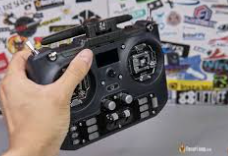
What pilots should know about protocols, gimbals, ergonomics, firmware, switches, and simulator training
A Radio Is a Long-Term Tool
Frames and motors may change frequently, but a well-chosen transmitter can serve across many aircraft. It stores models, sends control commands, displays telemetry, and gives the pilot the physical interface used on every flight. That makes comfort and ecosystem compatibility as important as headline range or the number of channels.
Begin by listing the aircraft you own or plan to build. Note their receiver protocols, channel needs, and whether you expect to fly tiny whoops, freestyle quads, wings, or long-range platforms. A radio that fits this plan reduces receiver changes and creates a consistent control layout across the fleet.
Protocol Compatibility Comes First
The transmitter module and receiver must speak the same protocol. ExpressLRS is widely used for low latency, telemetry, and flexible frequency options, while Crossfire, FrSky, and other systems remain present in many fleets. A radio may include an internal module, accept an external module, or be sold in several protocol versions. The selected variant matters.
When comparing a radio controller, verify the internal radio system, regional frequency version, antenna arrangement, and module-bay format. Do not assume that a familiar shell contains the same electronics in every listing. If using an external module, confirm power capability, physical fit, and EdgeTX support.
Choose the Right Form Factor
Full-size transmitters usually offer more switches, larger screens, and generous hand support. Compact radios are easier to pack and may feel natural to pilots familiar with game controllers. Weight matters during long sessions, but balance matters too; a heavier radio with a neck strap can be more comfortable than a lighter unit with awkward controls.
Your grip style influences the decision. Thumbers primarily move the sticks with their thumbs, while pinch or hybrid pilots also use their index fingers. Gimbal spacing, stick height, case shape, and switch placement feel different for each technique. If possible, handle the radio before buying or study dimensioned photos and feedback from pilots with a similar grip.
Gimbals Define the Everyday Experience
Hall-effect gimbals use magnetic sensing and are valued for consistency and reduced mechanical wear compared with traditional potentiometers. CNC gimbals may add adjustability and a premium feel, but well-made standard Hall gimbals can already provide precise control. Smooth movement, centering, tension range, and accessible adjustment are more important than material alone.
Check whether stick travel, spring tension, throttle friction, and ratchet can be adjusted without major disassembly. After purchase, calibrate the gimbals in firmware and avoid forcing the sticks during transport. Removable stick ends, folding antennas, or a protective case can be particularly valuable for a radio carried to flying sites.
Firmware, Models, and Switches
EdgeTX provides model profiles, input and mix logic, telemetry screens, voice alerts, timers, and Lua-script support on compatible radios. These features are powerful, but they also require deliberate setup. A clear screen and logical controls make configuration easier, while firmware updates and backups protect the work invested in model programming.
Count the switches and controls required for arming, flight modes, beeper, prearm, turtle mode, camera functions, and other features. More switches are not always better; their position and type must support safe habits. Use consistent assignments across models so arming and disarming remain automatic under pressure.
Use Simulator Support Before the First Flight
USB joystick support lets a radio connect directly to FPV simulators. This is one of the most valuable features for a beginner because it builds stick control without repair costs or field pressure. Experienced pilots can also practice new lines, racing tracks, or inverted moves. Check whether the connection carries data and power and whether a separate Bluetooth option is available.
Purchase decisions should also consider battery type, charging method, memory card access, spare parts, and community documentation. Retailers such as MEPSKING can make it easier to compare compact and full-size radios, but pilots should confirm the exact protocol variant and battery requirements before checkout.
Common Radio-Buying Mistakes
A frequent mistake is purchasing the wrong protocol variant because the radio shell and product name look identical. Another is budgeting for the transmitter but not the required batteries, charger, external module, or receiver replacements. Check the complete system cost. Regional frequency rules and firmware options should also be confirmed before ordering, especially for long-range equipment.
Pilots sometimes choose a large color display while ignoring ergonomics. Screens help with setup, but the sticks and switches are used continuously in flight. A simpler radio that feels natural can support better control than a feature-rich model that causes hand fatigue. Treat display, materials, and decorative editions as secondary to fit, link compatibility, and safe operation.
Set Up the Control Link Safely
After binding, confirm channel order, endpoints, switch direction, telemetry, packet rate, and failsafe with the propellers removed. Verify that signal-loss behavior disarms the aircraft. Use an appropriate power level and antenna orientation, and perform a range check before the first flight. Never treat a successful bind as proof that every control setting is correct.
The best transmitter is the one that fits the pilot, matches the receiver ecosystem, and remains easy to configure and carry. Prioritize protocol certainty, gimbal feel, ergonomics, and safe switch placement. Those qualities influence every flight and usually matter more than a feature that looks impressive on a comparison chart but is rarely used.
Disclaimer
This disclaimer applies to the discussion of FPV radio controllers. This article is for general information only. Product specifications, prices, availability, and warranties may change. Comfort, durability, performance, and other benefits depend on the model, use, care, and individual needs. Verify details with the manufacturer or seller, follow product instructions, and review return terms before purchasing.