






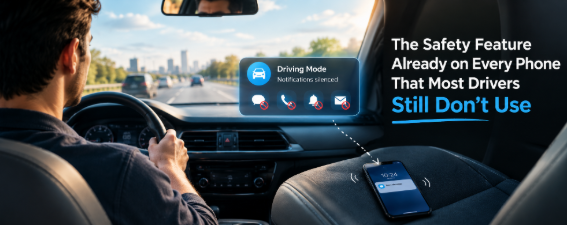
A phone buzzes on the passenger seat before a driver has consciously decided whether to look at it. That half-second of awareness, the pull toward the screen before any real choice gets made, is the exact moment a safe driving mode is designed to intercept. What’s less understood is how narrow that interception actually is. A driving mode doesn’t shut off a phone. It shuts off a specific category of interruption, and the gap between those two things explains a lot of the confusion people have about why distraction still happens with the feature turned on.
What a Safe Driving Mode Actually Changes
Apple introduced its version, Do Not Disturb While Driving, in iOS 11, and the mechanism hasn’t changed much since: the phone detects motion consistent with driving, either through onboard sensors or a Bluetooth connection to a vehicle, and silences incoming texts, calls, and notifications, replacing them with an auto-reply that lets senders know the driver is behind the wheel. Google’s equivalent, built into Android’s Do Not Disturb settings and branded as Driving Mode on Pixel devices, works the same way in principle, using motion and Bluetooth signals to detect driving and suppress notifications automatically. Both were built around the same specific target: the buzz, the banner, the glance that habit creates before a decision does.
That’s a real and measurable thing to fix. A silenced phone removes the trigger that starts the whole sequence, and removing the trigger is more reliable than hoping a driver resists it once it’s already there.
The Deliberate Gap: Why Navigation and Music Were Left Out
Here’s the detail that gets missed constantly: both companies built these features to explicitly exclude navigation and music. Apple’s own documentation on Do Not Disturb While Driving confirms that navigation directions and music playback continue working normally while the feature is active. Google’s Pixel implementation does the same, explicitly allowing turn-by-turn directions and, depending on setup, incoming calls to come through a connected Bluetooth system. This isn’t an oversight. It’s a deliberate design choice, because a phone that went fully dark would make the device useless for the trip itself.
The problem is that this carve-out leaves out one of the more demanding tasks a driver does on a phone. The AAA Foundation for Traffic Safety’s 2017 study of 30 vehicle infotainment systems found that programming a destination into navigation required an average of 40 seconds of visual and mental engagement, more than any other task tested, including texting. At 25 miles per hour, that’s roughly four football fields of driving before full attention returns. A phone driving mode, by design, does nothing to interrupt that specific task, because it was never built to. It solves the notification problem. It was never meant to solve the navigation problem, and it doesn’t claim to.
Automatic vs. Manual Activation
Even within the narrower job a safe driving mode is built for, how it gets turned on matters enormously. Apple’s and Google’s versions can be set to activate automatically, triggered by motion or a Bluetooth connection, or left as something a driver has to remember to switch on before every trip. Research on this distinction has been fairly consistent: features that require an active decision every drive tend to see usage fall off over time, while automatically triggered versions get used far more reliably, simply because there’s no decision left to skip.
This is also where the terminology gets muddled. “Driving mode,” “Do Not Disturb While Driving,” and third-party driving-mode apps aren’t interchangeable; they’re related but distinct approaches to the same underlying problem, built by different companies with different defaults and different scopes.
What a Safe Driving Mode Can’t Solve
None of this touches the kinds of distraction that have nothing to do with notifications. A hands-free call that gets through a driving mode’s exceptions still occupies cognitive attention the same way a handheld call would; research on hands-free conversation has repeatedly found that the mental workload of a conversation doesn’t disappear just because a driver’s hands stay on the wheel. A chatty passenger, a fussy kid in the back seat, a driver who’s exhausted after a double shift, none of that is a notification problem, and no driving mode, automatic or otherwise, was built to address it. Treating a quiet phone as proof that distraction has been handled skips over most of what actually competes for a driver’s attention.
Where Broader Technology Fits
This is where the distinction between a native phone setting and a dedicated third-party tool actually matters. A built-in driving mode is scoped narrowly on purpose, which is reasonable for a feature meant to ship on every phone regardless of how someone uses it. A purpose-built safe driving app can take a broader approach, since it isn’t constrained by needing to preserve every possible use case for every phone owner. Some are built around detecting when a vehicle itself is moving rather than relying only on a phone’s internal sensors, which changes what can realistically be covered and how reliably.
The practical takeaway isn’t that one approach is better across the board. It’s that a driver relying purely on a phone’s built-in setting should know exactly what it’s covering, and what it was deliberately left to allow through.
Building a Better Phone-Free Routine
A few habits make the existing tools work closer to how people assume they already do:
- Set the destination in a map app before leaving, since a safe driving mode won’t interrupt that task once the car is moving.
- Set automatic activation through Bluetooth or motion detection rather than relying on remembering to turn the feature on each trip.
- Treat a hands-free call as a real distraction, not a free pass, since the notification being silenced doesn’t mean the conversation’s mental load has disappeared.
- For families or teams managing multiple drivers, consider tools that look at vehicle motion broadly rather than relying solely on each individual phone’s settings.
A safe driving mode genuinely reduces one well-defined source of distraction, and it’s worth using for exactly that reason. It was never built to be the entire answer, and understanding where its boundaries were drawn, deliberately, by the companies that built it, is more useful than assuming a quiet phone means a focused driver. Tools like My Drive Guardian exist in the space just past that boundary, aimed at the parts of phone distraction a native setting was never designed to reach.
FAQs
Does driving mode block all notifications?
Not entirely. Apple’s and Google’s driving modes silence most texts, calls, and app notifications, but both explicitly allow navigation directions and music playback to continue, and users can set exceptions for specific contacts or apps.
Is driving mode the same as Do Not Disturb While Driving?
They’re closely related. “Do Not Disturb While Driving” is Apple’s specific name for its driving mode feature. Android’s equivalent, built into its Do Not Disturb settings, is often just called Driving Mode. Third-party apps offer their own separate versions that may work differently.
Can driving mode completely prevent distracted driving?
No. It reduces one specific source of distraction (notifications), but doesn’t address hands-free conversations, navigation interaction, passenger distraction, or fatigue, all of which can still pull a driver’s attention away from the road.
Disclaimer
This article is for informational and educational purposes only. Safe driving mode and related phone features reduce notifications but cannot eliminate all visual, cognitive, or physical driving distractions. Drivers remain fully responsible for maintaining focus on the road and adhering to all safe driving laws.