









Smart glasses are generally safe for your eyes when they are designed well, adjusted correctly, and used with healthy viewing habits. The main concerns are usually eye strain, dryness, glare sensitivity, and fatigue rather than permanent eye damage from normal use. Comfort depends on how the display projects images, how bright the screen is, and how long you wear the device without breaks. Fit also matters, because poor alignment can make your eyes work harder to stay focused. If you are thinking about using smart glasses for entertainment, work, or travel, it helps to understand what affects eye comfort and what safety features actually reduce strain during everyday viewing over longer sessions.
How Smart Glasses Affect Your Eyes During Daily Use
Screen Distance, Display Technology, and Eye Comfort
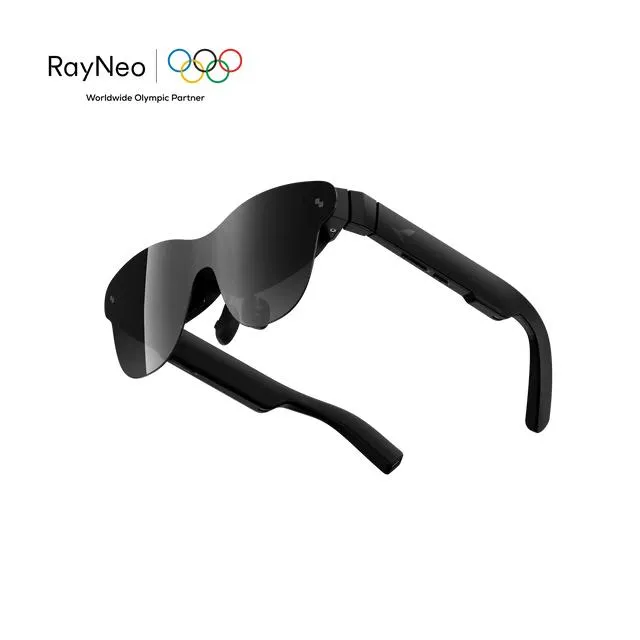
Smart glasses do not place a physical screen directly on your eyeballs, but they can still make your visual system work harder if the image is poorly aligned or difficult to focus on. Comfort improves when the virtual image appears at a natural viewing distance and remains stable across movement. Display quality also matters. Clear contrast, smooth refresh rates, and balanced color reduce the effort needed to maintain focus. On the RayNeo Air 4 Pro AR Glasses, the HDR10 AR display, Vision 4000 processing, and up to 120Hz playback are designed to keep visuals sharp and fluid. That can help reduce visual fatigue during movies, gaming, or extended media use, especially in longer sessions overall.
Brightness, Blue Light, and Long-Term Viewing Habits
Brightness has a direct effect on eye comfort. A display that is too dim can cause squinting, while one that is too bright can increase glare and visual fatigue. Blue light is also part of the conversation, but the bigger issue for most users is prolonged close attention without enough breaks. Long viewing sessions reduce blinking, which may lead to dryness and irritation. Safer smart glasses support better light management and flicker control. RayNeo Air 4 Pro includes OptiCare™ Eye Protection with 3840Hz dimming, low blue light, and flicker-free performance to reduce eye strain. Even with these features, healthy habits still matter when you watch content daily for extended periods.
Key Factors That Make Smart Glasses Safer to Wear
Lightweight Design and Proper Wearing Position
A smart glasses device feels safer and more comfortable when it sits securely without pressing too hard on the nose, ears, or temples. Excess pressure can create discomfort that users sometimes mistake for eye strain. Proper alignment is equally important because a crooked display position may force your eyes to compensate. Lightweight construction helps reduce facial fatigue during longer sessions and encourages a more natural viewing posture. Adjustable components also make a real difference for people with different face shapes. A well-fitted pair should keep the image centered and stable without constant repositioning. When smart glasses support prescription lenses or inserts, they also help users maintain clearer focus and reduce unnecessary visual effort.
Smart Features That Improve User Comfort and Control
Comfort is not only about hardware weight; it also depends on how much control the user has over the viewing experience. Useful comfort features include brightness adjustment, stable image rendering, easy connectivity, and audio options that reduce the need for higher volume in noisy settings. RayNeo Air 4 Pro adds several practical benefits here: a 76g frame, adjustable nose pads, flexible temples, prescription-ready support, and universal USB-C and HDMI adapter connectivity across phones, laptops, and consoles. Premium audio by B&O can also reduce reliance on separate accessories. These features do not just make the device convenient. They help users set up the glasses properly and maintain more comfortable daily wear over longer sessions.
Practical Tips for Using Smart Glasses Without Eye Strain
Best Practices for Screen Time and Breaks
The simplest way to protect your eyes while using smart glasses is to limit uninterrupted viewing time. Follow the 20-20-20 rule: every 20 minutes, look at something around 20 feet away for 20 seconds. This relaxes focusing muscles and encourages blinking. Keep sessions shorter when you first start using the device so your eyes can adapt gradually. If your eyes feel dry, blink deliberately and consider using lubricating drops recommended by an eye care professional. Stop using the glasses if you develop headaches, nausea, or persistent blur. Smart glasses should feel comfortable, not demanding. Taking regular breaks, staying hydrated, and wearing the device only when properly fitted all help reduce eye strain significantly.
Adjusting Settings for a More Comfortable Viewing Experience
Start with brightness at the lowest level that still looks clear, then raise it only when ambient light requires it. High brightness in a dim room often causes unnecessary discomfort. If your smart glasses offer color, contrast, or display mode adjustments, choose settings that look natural rather than overly vivid. Keep the image centered and refit the glasses if text seems uneven or hard to read. Use prescription support if you normally wear corrective lenses, since squinting creates extra fatigue. Match your content type to the device settings too; fast gaming may benefit from smoother refresh settings, while movie viewing may need lower brightness. Small adjustments often make a major difference in long-session comfort.
Conclusion
Smart glasses are safe for your eyes for most people when the device is well designed and used responsibly. The real risks are usually short-term comfort issues such as strain, dryness, glare, and fatigue, not direct harm from normal viewing. Choosing glasses with low blue light support, flicker-free dimming, stable image quality, and an ergonomic fit can make daily use much easier on your eyes. Just as important, you should manage brightness, take regular breaks, and make sure the display sits correctly in your field of view. If you already have vision concerns, prescription support and a proper fit matter even more. Used thoughtfully, smart glasses can be an enjoyable, comfortable screen option rather than an eye health problem.
Disclaimer
This disclaimer applies to the discussion of smart glasses and eye comfort. This article is for general information only and is not a substitute for medical advice, diagnosis, or treatment. Claims about benefits, safety, and results may not apply to everyone. Consult a qualified healthcare professional about personal suitability, and check current product instructions before use. No specific health outcome is guaranteed.